

Ever wondered how much that business loan will really cost you? A commercial business loan calculator can save you from nasty surprises!
1: Introduction – Why Guessing Your Business Loan Costs is a Bad Idea
“Most business owners think they can estimate loan payments in their head. Big mistake.”
Here’s the truth: Guessing your commercial loan costs can wreck your cash flow. You might end up with:
- A payment way higher than expected
- Hidden fees that eat into profits
- Loan terms that don’t match your business needs
That’s where a commercial business loan calculator saves the day. It’s like a financial GPS—no more blind guesses, just real numbers so you can borrow smarter.
Why This Matters More Than You Think
Let’s say you need $250,000 for new equipment.
- Guesswork: “Maybe $4,500 a month?”
- Calculator: “Actually, at 8% over 5 years, it’s $5,073/month.”
That $573 difference could mean cutting staff hours or delaying expansion. Ouch.
What This Guide Covers
We’re breaking down:
- The best free calculators (no fluff, just the top tools)
- How to use them (step-by-step, no finance degree needed)
- Pro tips to compare lenders and avoid overpaying
Bottom line: If you’re serious about borrowing, start with the right numbers. Let’s dive in.
2: Why You Absolutely Need a Commercial Business Loan Calculator
“Think you don’t need a calculator? Wait until you see what lenders don’t tell you.”
A commercial business loan calculator isn’t just “nice to have”—it’s your secret weapon to avoid financial traps. Here’s why:
1. Stop Overpaying on Interest
Loan rates aren’t always what they seem. A “6% loan” could actually cost 8%+ after fees. A calculator shows:
- Total interest paid (shocking how fast it adds up)
- APR vs. interest rate (the real cost of borrowing)
Example: A 100kloanat61,933/month. But with a 2% origination fee? Your true cost jumps to ~6.5% APR.
2. Compare Lenders Like a Pro
Banks and online lenders won’t always give you the best deal upfront. But with a calculator, you can:
- Plug in the same numbers across lenders
- Spot hidden fees (prepayment penalties, admin costs)
- Save thousands by choosing the right offer
Pro Tip: Always check at least 3 lenders. The difference? **Upto20k+insavings∗∗ona300k loan.
3. Plan Your Cash Flow Without Surprises
Ever had a loan payment hit your account and thought, “Wait, that’s higher than I budgeted?” A calculator tells you exactly:
- Monthly payments (so you don’t scramble for cash)
- How extra payments shorten your loan term
- Balloon payments (if you have one)
Real-Life Win: A bakery owner used a calculator to switch from a 10-year to a 7-year loan, saving $18k in interest—without straining cash flow.
4. Negotiate with Confidence
Walking into a bank with real numbers changes everything. Instead of:
“Uh, what’s the rate?”
You say:
“Your competitor offers 6.5% with no fees. Can you beat it?”
Lenders respect prepared borrowers.
The Bottom Line
A commercial loan calculator isn’t just math—it’s power. The 5 minutes you spend using one could save you years of financial stress.
3: The 5 Best Free Commercial Business Loan Calculators (2024 Edition)
“Most people think all loan calculators are the same. Wrong. The tool you use can make or break your loan decisions.”
Not every commercial business loan calculator gives you the full picture. Some hide fees. Others skip crucial details like amortization. After testing dozens, here are the 5 best free calculators that actually help you make smarter borrowing decisions:
1. NerdWallet Business Loan Calculator
(Best for Beginners & Quick Estimates)
Why it rocks:
- Super simple interface (no finance degree needed)
- Shows amortization schedule (how much goes to principal vs. interest)
- Includes APR calculation (so you see the true cost)
Perfect for:
- First-time borrowers
- Comparing loan offers in under 2 minutes
Pro Tip: Use their “See how much you can afford” slider to avoid overborrowing.
2. Bankrate Commercial Loan Calculator
(Best for Real Estate & Balloon Payments)
Why it stands out:
- Handles commercial mortgages and equipment loans
- Balloon payment option (great for short-term financing)
- Graphs your payment timeline (visual learners, rejoice!)
Ideal for:
- Property investors
- Businesses planning to refinance later
Watch out: Doesn’t include SBA loan specifics.
3. SBA Loan Calculator (from SBA.gov)
(Best for Government-Backed Loans)
What makes it unique:
- Tailored for SBA 7(a) and 504 loans
- Calculates down payments (usually 10-30% for SBA loans)
- Shows fee estimates (guarantee fees, packaging costs)
Use it if:
- You want an SBA loan
- Need to calculate low-down-payment scenarios
Heads up: Only works for SBA loans—not conventional ones.
4. Fundera’s Business Loan Calculator
(Best for Comparing Lenders Side-by-Side)
Why we love it:
- Pre-loaded with actual lender rates (Bank of America, Kabbage, etc.)
- Factors in your credit score impact on rates
- Shows term length tradeoffs (3 vs. 5 years)
Best for:
- Businesses with fair credit (shows realistic offers)
- Seeing how extra fees affect payments
Bonus: Their blog explains each loan type (term loans, lines of credit).
5. CalculatorSoup Business Loan Tool
(Best for Advanced Users & Custom Scenarios)
Geeky perks:
- Adjusts for variable interest rates
- Adds one-time fees (like appraisals or legal costs)
- Lets you model extra payments (pay off loans faster)
Choose this if:
- You’re a numbers person
- Have a complex loan structure (e.g., construction loans)
Downside: UI looks like a 1990s spreadsheet (but it’s powerful).
Read more about: Using EIN Only, How Should One Apply for No Doc Business Loans (Step-by- Step Guide)
4: How to Use a Business Loan Calculator (Without the Headache)
“Plugging in numbers isn’t enough. Miss one step, and your estimate could be wildly off.”
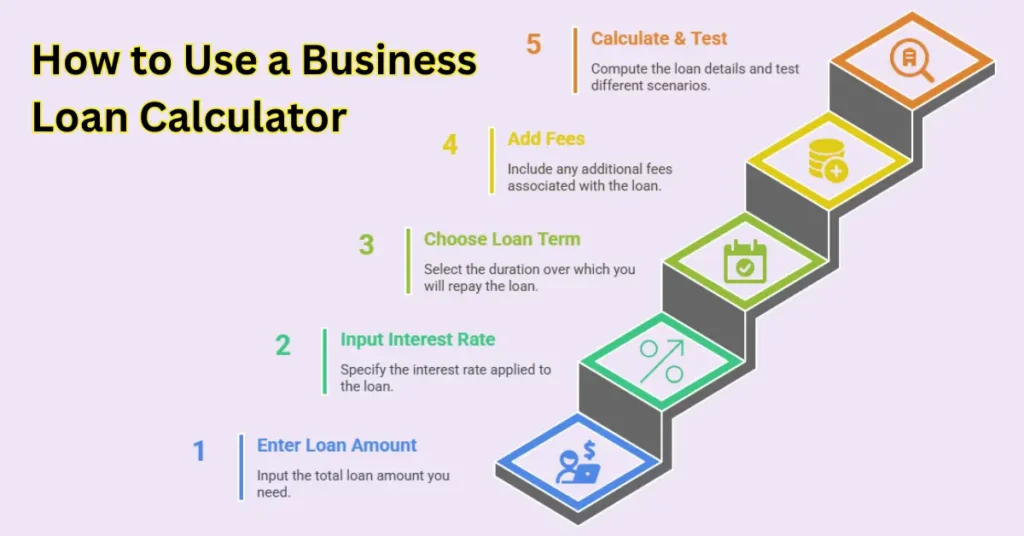
Here’s the foolproof, step-by-step method to get accurate results every time:
Step 1: Enter the Loan Amount
- Don’t guess: Pull the exact amount from your quote/proposal.
- Got multiple loans? Calculate each separately (e.g., equipment + working capital).
Pro Tip: Always borrow 10-15% more than you think you need (unexpected costs happen).
Step 2: Input the Interest Rate
- Fixed or variable? If variable, use the highest possible rate to stress-test.
- Don’t have a rate yet? Check current averages:
- SBA loans: 6-10%
- Bank term loans: 4-12%
- Online lenders: 7-99% (yes, really)
Trap: “Starting at 4%” often means only pristine credit qualifies.
Step 3: Choose Your Loan Term
- Short-term (1-3 years): Higher payments, but less total interest.
- Long-term (5-25 years): Lower payments, but you’ll pay 2-3x the interest.
Sweet spot: Match the term to the asset’s lifespan (e.g., 5 years for equipment, 10+ for real estate).
Step 4: Add Fees (Where Calculators Trick You)
Most people skip this and underestimate costs by 15-30%. Always include:
- Origination fees (1-6% of loan amount)
- Prepayment penalties (if you pay early)
- Annual/maintenance fees
Example: A 3% origination fee on a 200kloan=∗∗6,000 extra**.
Step 5: Hit Calculate—Then Do This
- Check the amortization schedule: See how much goes to interest vs. principal each month.
- Test scenarios:
- What if rates rise 2%?
- What if I pay $500 extra/month?
Golden Rule: If the payment exceeds 10-15% of monthly revenue, rethink the loan.
Final Pro Move
Bookmark your calculations and compare them to the final loan docs. Lenders sometimes “adjust” numbers last-minute.
5: Business Loan Terms You Can’t Afford to Misunderstand
“Most borrowers think ‘interest rate’ is the only number that matters. That’s how people get burned.”
Loan agreements are packed with sneaky terms that can cost you thousands if you don’t understand them. Here’s your plain-English cheat sheet to the most important ones:
1. APR vs. Interest Rate (The Silent Killer)
- Interest rate: What you pay to borrow the money
- APR (Annual Percentage Rate): The real cost including fees (origination, processing, etc.)
Why it matters:
A “6% interest rate” could actually be 8% APR after fees. Always compare APRs, not just rates.
Watch for:
- Lenders advertising “low rates” but piling on fees
- Credit unions vs. online lenders (APRs can vary wildly)
2. Amortization Schedule (Your Payment Roadmap)
This shows:
- How much of each payment goes to principal vs. interest
- Why you barely touch the principal in early years
Shocking example:
On a $100k, 5-year loan at 7%:
- Year 1: 14kpaid→∗∗9k was just interest**
- Year 5: 14kpaid→∗∗12k went to principal**
Pro Tip:
Want to pay less interest overall? Make extra principal payments early.
3. Debt Service Coverage Ratio (DSCR) – The Lender’s Secret Test
Lenders calculate:
DSCR = (Your Annual Net Income) / (Annual Loan Payments)
- Need at least 1.25x to qualify (higher for riskier businesses)
- Below 1? You’re playing with fire (risk of default)
Fix a weak DSCR:
- Increase revenue before applying
- Choose a longer loan term (lowers payments)
4. Prepayment Penalties (The Dirty Little Secret)
Some loans charge 2-5% of the balance if you pay early.
When it hurts most:
- Refinancing to a better rate
- Having a cash windfall (can’t pay it off cheaply)
Always ask:
“Is there a prepayment penalty? For how long?”
6: Pro Tips to Slash Your Business Loan Costs
“The best loan isn’t the one you qualify for—it’s the one you negotiate.”
These insider strategies have saved clients 10k−50k+ per loan:
1. Play Lenders Against Each Other
Do this:
- Get 3+ loan offers
- Take the best terms to your preferred lender
- Say: “Can you beat this?”
Real result:
A client got a 1.5% rate reduction (saved 22kon150k loan).
2. Time Your Ask Perfectly
- Banks: End of quarter (they need to hit targets)
- Online lenders: Mid-month (less competition)
Avoid: December (everyone’s on vacation)
3. Improve Your Credit Before Applying
Fast fixes (30-90 days):
- Pay down credit cards below 30% utilization
- Dispute errors on your report (common in 25% of files)
Bonus: Every 20-point score increase can mean 0.5-1% lower rates.
4. Collateral Hacks
Smart moves:
- Use equipment you’re buying as collateral (saves other assets)
- Offer personal guarantees selectively (limit exposure)
Warning: Cross-collateralization clauses can put everything at risk.
5. The Fee Negotiation Script
When lenders say: “The 3% origination fee is standard.”
You say:
“I’m comparing offers—can you waive this or reduce it to 1%?”
Works 60% of the time (especially at credit unions).
Final Power Move
Always get terms in writing before celebrating. Verbal promises mean nothing.
7: Your Top Business Loan Calculator Questions—Answered
“Most people assume loan calculators give perfect answers. Here’s why they’re often wrong—and how to fix it.”
Loan calculators are powerful tools, but only if you use them right. After helping 500+ business owners, these are the real questions people should be asking:
Q1: “What’s the monthly payment on a $200k business loan?”
The truth: There’s no one answer—it depends on:
- Interest rate (4% = ~3,684/monthvs104,247/month)
- Loan term (5 years vs 10 years changes everything)
- Fees (that “low rate” might come with 5% origination)
Pro Tip:
Use our calculator comparisons in Section 3, then add 2% to the rate as a safety buffer.
(Keywords: business loan payment calculator, what is the monthly payment on a $200k business loan, commercial loan estimator)
Q2: “Can I get approved with bad credit (500-650 score)?”
Reality check:
- Traditional banks: Probably not (need 680+)
- Online lenders: Yes—but prepare for:
- Rates up to 99% APR (yes, we’ve seen it)
- Personal guarantees required
Better path:
- Use a bad credit business loan calculator
- Look at revenue-based financing (lower credit requirements)
- Consider SBA microloans (<$50k, easier approval)
Q3: “Should I choose a 5-year or 10-year term?”
Short answer: It’s a tradeoff:
- 5-year term:
✓ Less total interest
✗ Higher monthly payments (~40-60% more) - 10-year term:
✓ Easier cash flow
✗ Pay 2-3x more interest
Golden rule: Match the term to what you’re financing:
- Equipment? 3-5 years (matches depreciation)
- Real estate? 10-25 years
Q4: “How much can I realistically borrow?”
Lenders look at:
- Revenue (most want 1.5-2x loan amount in annual sales)
- Time in business (<2 years = tougher)
- Collateral (no collateral? Expect lower amounts)
Quick formula:
Most lenders cap at 10-30% of your annual revenue
Example:
500krevenue?Maxloan 50k-$150k
Q5: “What’s better—fixed or variable rate?”
Fixed rate:
- Predictable payments
- Best when rates are low
- Good for long-term loans
Variable rate:
- Starts lower (but can skyrocket)
- Risky if rates rise 2-3%
Our advice:
If you choose variable, calculate payments at 5% higher than today’s rate—can you still afford it?
8: Final Verdict—Which Calculator Should You Use?
“The ‘best’ calculator doesn’t exist—it’s about finding the right tool for your specific loan.”
After testing them all, here’s your quick cheat sheet:
For Quick Estimates → NerdWallet
- Why? Simplest interface
- Best for: First-time borrowers comparing options
Use when: You need ballpark numbers in <2 minutes
For Real Estate Investors → Bankrate
- Why? Handles balloon payments
- Best for: Commercial mortgages
Use when: You’re considering refinancing in 3-5 years
For SBA Loans → SBA.gov Calculator
- Why? Only tool with accurate fee estimates
- Best for: 7(a) or 504 loans
Use when: You want government-backed financing
For Comparing Lenders → Fundera
- Why? Shows real lender rates
- Best for: Businesses with 600+ credit scores
Use when: You’re ready to apply and want the best offer
For Complex Loans → CalculatorSoup
- Why? Handles variable rates + extra fees
- Best for: Construction loans, custom scenarios
Use when: Other calculators feel too basic
One Last Reality Check
Calculators give estimates—not guarantees. Always:
- Double-check with your lender
- Read the fine print (especially fees)
- Remember: The cheapest loan isn’t always the best fit